

Zoom the Roast Chart
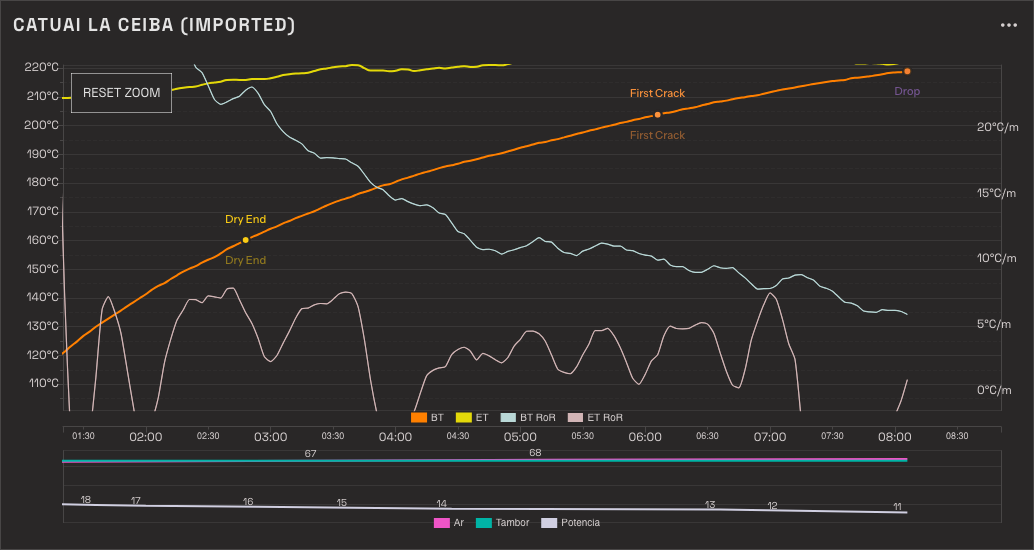
The roast chart zooms. On a saved Batch, and on the live chart while you roast, you can look closer at any part of the roast, move around it, and come back to the whole roast when you are done. Zoom changes how the Curve is drawn. It changes nothing about what was recorded.
Zoom arrived in Rostoc 0.4.5. On an earlier version the chart does not zoom, so update first if you cannot find it.
Zoom in
Section titled “Zoom in”Point at the part of the roast you want to see, then either:
- pinch on a trackpad, or
- hold Ctrl (Cmd on a Mac) and scroll.
The chart zooms in around the pointer. Time and temperature zoom together, by the same amount, so the Curve keeps its shape: a slope looks as steep zoomed in as it did before, and one roast’s slopes still compare with another’s. The Rate of Rise scale on the right-hand side follows the same zoom.
However far in you go, minute marks stay on whole minutes and temperature ticks on round degrees.
Scrolling without the key held scrolls the page, even with the pointer over the chart.
Move around
Section titled “Move around”Drag the plot to move the view: along the roast, or up and down the temperature range.
Come back to the whole roast
Section titled “Come back to the whole roast”Once you have zoomed, a Reset zoom button appears in the top-left corner of the plot. Click it to see the whole roast again. The button goes away when the full view is back.
Zoom while a roast is recording
Section titled “Zoom while a roast is recording”In Roast Studio, a zoomed view keeps up with the roast. As readings arrive the view slides along, in time and in bean temperature, so the live reading stays in the picture.
Scroll back to look at something that happened earlier and the view holds still. A Back to live button appears beside Reset zoom; click it to rejoin the roast where it is now.
What zoom does not change
Section titled “What zoom does not change”- Your roast. Zoom is a way of looking. Nothing is saved when you zoom, no reading is dropped, and the Batch is the same before and after.
- Milestones. You can still mark or move a milestone while zoomed: a click on the chart opens the milestone menu at the point you clicked, and choosing a milestone you already marked moves it there. A drag on the plot only moves the view. Marking or moving a milestone, and showing or hiding a series from the legend, leave your zoom exactly where it was.
- The shared image. Share chart always shows the whole roast, however far in you have zoomed. See Batch details.