Nucleus Link sample roasting software with inventory tracking.
Rostoc supports Nucleus Link live roast logging for supported setups and connects sample roasts to green coffee inventory, lots, roast plans, batches, and roastery records. That makes the sample roast part of the same operational history as the production decisions that follow.
Updated June 21, 2026 | Rostoc
Direct Answer
Yes. Rostoc supports Nucleus Link for live sample roast logging on supported setups.
The important part is what happens around the sample roast. Rostoc can connect Nucleus Link roast data to green coffee inventory, lots, roast plans, batches, and later roastery records. That fills a common gap in sample roasting workflows, where the profile is captured but inventory movement and decision context live somewhere else.
- Use Nucleus Link as a sample roaster.
- Capture live roast data from supported Nucleus Link setups.
- Connect sample roasts to green coffee lots and inventory context.
- Keep sample roast evidence available when deciding whether to buy, profile, or produce a coffee.
Why Inventory Matters For Nucleus Link Sample Roasting
Nucleus positions Link around small-batch sample roasting, with 50g-100g batch capacity, the Link App, and Link Studio for profiles and live tracking. That is a strong native workflow for getting repeatable sample roasts from a portable roaster.
The operational gap appears after the sample roast is captured. Sample roasting still consumes green coffee, even when the dose is small. If that usage is tracked only in notes, spreadsheets, or memory, the roastery can lose the connection between the green lot, the sample roast, cupping feedback, and the production decision that follows.
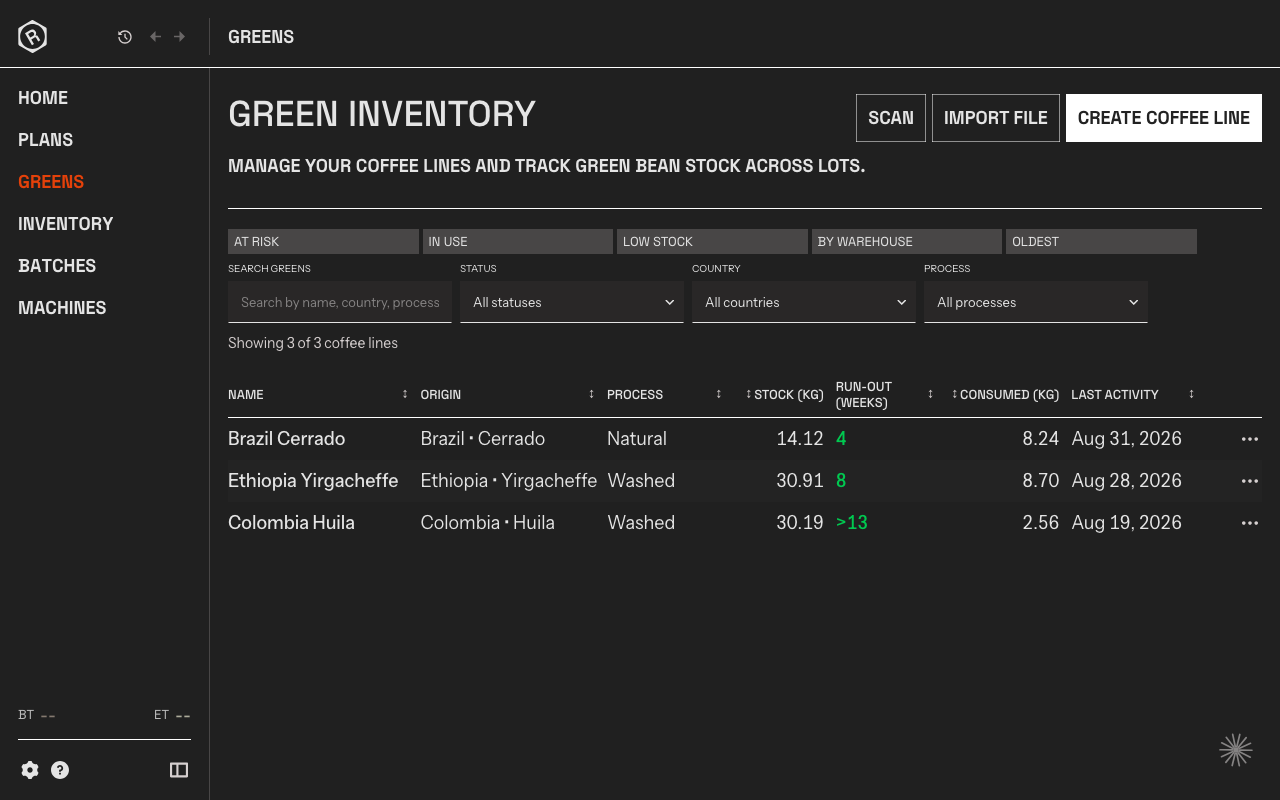
Rostoc is designed to keep that context together. A Nucleus Link sample roast can sit beside the same inventory and production workflow used for green lots, plans, batches, roast profiles, and saved records.
How Rostoc Fits Alongside Link Studio
Link Studio remains useful for native Nucleus Link workflows: profile selection, roast setup, and Link-specific operation. Rostoc is not trying to replace every native Link workflow.
Rostoc is useful when the sample roast needs to become part of the roastery record. That means knowing which green lot was sampled, how much coffee was used, what roast data was captured, and whether the sample led to a production roast, purchase decision, or profile adjustment.
For a roastery, that difference matters. The curve answers what happened during one roast. The inventory-connected record answers why the sample existed, what coffee it consumed, and what decision came from it.
| Workflow | Best fit | Why it matters |
|---|---|---|
| Link App and Link Studio | Native Link setup, profiles, and roaster operation | Keeps the Nucleus Link workflow close to the machine and profile system. |
| Rostoc | Inventory-connected sample roasting and roastery records | Connects the roast to green lots, stock movement, plans, batches, and decisions. |
| Spreadsheet or notebook | Temporary notes when the process is still informal | Easy to start, but inventory, curves, cupping notes, and production decisions can drift apart. |
Nucleus Link Support: Rostoc And Cropster
Cropster publicly documents Nucleus Link Sample Roaster support in a setup page marked as beta. That page lists USB connection requirements and supported measurements including bean temperature and fan speed, and it indicates that beta registration or access may be required.
Rostoc now supports Nucleus Link with a different emphasis: sample roasting data connected to inventory, lots, roast plans, batches, and production history. For teams evaluating Nucleus Link software, the practical question is not only whether the curve can be logged, but whether the sample roast remains connected to the coffee and decision workflow afterward.
| Question | Rostoc answer |
|---|---|
| Does Rostoc support Nucleus Link? | Yes, for supported Nucleus Link live roast logging workflows. |
| Is this only about capturing a curve? | No. The differentiator is connecting the sample roast to green inventory and roastery records. |
| Does Cropster support Nucleus Link? | Cropster publicly lists a Nucleus Link Sample Roaster Roasting Intelligence setup page and labels it beta. |
| Should I still use Link Studio? | Often yes. Link Studio is useful for native Nucleus Link workflows; Rostoc adds roastery context around the sample roast. |
Setup Requirements
Before relying on Nucleus Link support in any roasting software, confirm the exact device, cable, operating system, and workflow you want to use. Machine support should be treated as setup-specific, especially when the roaster is part of a daily quality-control workflow.
If you are evaluating Rostoc for Nucleus Link sample roasting, start with the integration page, then check the Nucleus Link setup guide, machine support, and the green coffee inventory workflow.
- Confirm the Nucleus Link hardware and firmware setup.
- Use the expected USB connection path.
- Run a short sample roast and compare the logged values with what the roaster shows.
- Attach the roast to the correct green lot so sample usage and tasting decisions stay traceable.
Source Notes
Nucleus describes Link as a small-batch sample roaster with Link App and Link Studio workflows, including profile selection and live tracking: Nucleus Link product page and How to use the LINK.
Cropster's public help page for Nucleus Link is titled as a beta setup page and lists USB, bean temperature, fan speed, and auto-start details: Cropster Nucleus Link setup beta.
FAQ
Does Rostoc support Nucleus Link?
Yes. Rostoc supports Nucleus Link live sample roast logging for supported setups.
Can Rostoc track inventory for Nucleus Link sample roasting?
Yes. Rostoc can connect sample roasts to green coffee inventory, lots, roast plans, batches, and roastery records so sample usage and decisions do not live only in notes or spreadsheets.
Does Nucleus Link work with Cropster?
Cropster publicly documents a Nucleus Link Sample Roaster setup page and labels the integration beta. Teams comparing options should check the current Cropster setup page, beta registration requirements, and their own account access.
Does Rostoc replace Link Studio?
Not necessarily. Link Studio remains useful for native Nucleus Link workflows. Rostoc is useful when the sample roast should also be connected to inventory, lots, batches, roast plans, and production decisions.
What Nucleus Link data does Rostoc use?
Rostoc focuses on live roast logging for supported Nucleus Link setups and connects the resulting roast record to inventory and roastery workflow context. Confirm the exact setup before relying on it for daily production or sample-roasting records.