Green coffee inventory: track stock and trace each roast
You're planning tomorrow's batches. The stock sheet says there is enough coffee, but the opened bag looks lighter than you expected. Before you can finish the plan, you need to know whether a roast went unrecorded, a sample was taken, or some coffee is sitting in another container.
Updated October 3, 2026 | Rostoc
A useful green coffee inventory makes those questions easier to answer. Give each lot an identifier, record what comes in and goes out, and check the balance against the coffee on your shelves.
The same records give you traceability: a way to follow a roast back to the lot it used, then to that lot's delivery and supplier information. A balance tells you how much remains. The links between records help you understand where the coffee went.
Paper, a spreadsheet, and dedicated software can all support that routine. Let's follow one lot through a working week so you can see what needs recording and where mistakes can creep in.
1. Give each lot a name you can follow
The name on your menu may be too broad for a stock record. Two deliveries can both be “Colombia washed” while arriving on different dates, in different quantities, or with different supplier references.
Give each received lot a unique identifier alongside its familiar coffee description. For example, COL-026 and COL-027 might describe separate deliveries. The exact format matters less than using it consistently on the stock record, containers, and roast records.
Retain the supplier's lot or shipment reference too. Your internal identifier makes everyday handling easier; the supplier reference helps when discussing the delivery. If a shipment contains several distinct supplier lots, preserve those distinctions.
Two bags can share a name without sharing a history
“Colombia washed” helps someone recognise the coffee. A lot identifier helps them find the actual delivery that supplied Tuesday's batch. Keeping both means the record remains readable when another delivery arrives with the same familiar description.
If your supplier sends a larger purchase in several releases, keep each arrival date and quantity alongside the supplier's original lot reference. You should be able to find both the particular delivery and the coffee it belongs to.
2. Start with a useful stock record
Keep the essential fields easy to find. A practical starting record looks like this:
| Field | Illustrative entry | What it answers |
|---|---|---|
| Internal lot identifier | COL-026 | Which stock record is this? |
| Coffee description | Colombia, washed | Which coffee are we handling? |
| Supplier/reference | Supplier A / shipment 184 | Where did it come from? |
| Arrival date | 5 October | When did this receipt arrive? |
| Net green weight and unit | 60.00 kg | How much coffee was received? |
| Location | Rack B, shelf 2 | Where can we find it? |
| Notes | Liner intact at receiving | What needs remembering? |
This is an example you can adapt to your own record. Add crop information, costs, or tasting notes when you use them. Begin with fields you can keep up to date on a busy roast day.
Use net coffee weight, excluding the package. Weigh the empty container first, or tare the scale before filling it. Write the unit in the column heading so nobody has to guess later. If you buy in pounds and roast in kilograms, use one agreed conversion and retain the supplier's original quantity.
The initial record describes the lot. A separate movement log describes what happened to it over time.
3. Record changes when they happen
Add a row whenever coffee arrives, is roasted, is used for a sample, or moves between locations. Include the date, lot identifier, quantity and unit, type of movement, and a batch reference or short explanation. The record should tell the next person what happened without needing to ask you.
For roasting, record the actual charged green weight. If the plan called for 10 kg and you charged 9.8 kg, stock supplied 9.8 kg. The plan is useful context; the measured charge is the consumption.
Keep a way to record small withdrawals close to where they happen. A 200 g sample is easy to forget when the sheet is on another computer. If you record it later, leave a dated note with the lot and weight so it makes it into the log.
Transfers need a source and destination. Moving 5 kg from storage to a preparation bin changes where the coffee sits. It does not reduce total green inventory. If you maintain balances by location, subtract it from one location and add it to the other.
Keep corrections visible. A changed balance should leave a reader able to understand what was changed, why, and when. A spreadsheet can do this with a movement table; software can do it with an appropriate transaction history. Choose a method your team will actually maintain.
4. Make the record traceable in both directions
Try a simple check: choose a saved roast and find the lot that supplied it. Can you then find the delivery, supplier reference, and any quality measurements or notes recorded for that lot? Now start from the lot and find the batches that consumed it. Those two directions make the history useful when you are reviewing a coffee or investigating a difference between batches.
For a blend, record each component lot and the green weight it supplied. “House blend, 10 kg” tells you what you made, but not which deliveries went into it. A record of 6 kg from one lot and 4 kg from another keeps the ingredients identifiable even when one component changes with the next delivery.
Keep those references intact when moving or splitting stock. If a portion receives a new lot identifier, retain a link to its source. It should still be possible to follow that coffee back through the move.
For example, if you notice a quality difference in a batch, its lot link lets you find other batches from that delivery and review the receiving notes. It gives you a focused set of records to compare without assuming that the green coffee caused the difference.
5. Follow one lot through a working week
Here is an invented example for COL-026. All quantities are net green coffee in kilograms; the balance covers the whole roastery.
| Day | Movement | Change, kg | Expected balance, kg |
|---|---|---|---|
| Monday | Receive the lot | +60.00 | 60.00 |
| Tuesday | Charge batch R-101 | −10.00 | 50.00 |
| Tuesday | Charge batch R-102 | −10.00 | 40.00 |
| Wednesday | Sample roast S-014 | −0.20 | 39.80 |
| Thursday | Move 5 kg to the preparation bin | 0.00 total | 39.80 |
| Friday | Charge batch R-103 | −8.00 | 31.80 |
| Friday | Stocktake correction | −0.15 | 31.65 |
Before the stocktake, the expected balance is 60 − 10 − 10 − 0.20 − 8 = 31.80 kg. The transfer has no effect on the total. When weighing physical stock, include both the preparation bin and the storage location.
Suppose the measured total is 31.65 kg. Before changing the balance, check the scale, empty-container weights, units, and every storage location. Look for a withdrawal that hasn't been entered yet. If you still cannot explain the difference, enter a −0.15 kg correction with an honest note: ‘Friday stocktake: measured 31.65 kg; 0.15 kg discrepancy unresolved.’
Now the record matches what you measured, and the reason for the change is still visible. If you later find the missing withdrawal, correct the entries together so you don't deduct the same coffee twice.
Roast loss belongs in the yield calculation
A batch charged with 10 kg of green coffee that produces 8.5 kg roasted consumed 10 kg from the green lot. The 1.5 kg difference is a 15% roast loss for that example. Deducting it again from green inventory would count the loss twice. Keep charge and finished weights separate; 15% is illustrative, not a target.
6. Reconcile the record with the shelves
If you are building the habit, start with one fixed weekly check of the coffees in regular use. Choose a quiet moment, such as after the last roast of the week. Adjust the frequency as you learn where differences occur and how quickly they matter.
Pause movements during the count, or agree a clear cutoff and record anything that moves after it. Otherwise, someone can weigh a container while another person is charging a batch from it.
Count every location and use net weights. Check that each container belongs to the lot you think it does. Compare measured and expected quantities before entering corrections, and retain the explanation for differences.
If the same discrepancy returns, look for the point where the record loses touch with the coffee: samples taken without a note, changing container weights, a roast assigned to the wrong lot, or a transfer entered as consumption. A small change at that point may be easier to maintain than asking everyone to be more careful.
Before the next roast
- Confirm the lot identifier on the container and batch record.
- Check the available balance and physical location.
- Weigh and record the actual green charge.
- Record samples and other withdrawals separately.
- Treat transfers as location changes.
- Reconcile physical stock and explain corrections.
Let each roast keep the stock record up to date
Rostoc connects green coffee lots to roast batches, recording consumption when a batch is saved against a lot. That connection also preserves traceability: you can return from a batch to the coffee it consumed and review the stock movements behind the balance. Adjustments carry a reason, so a physical count has an explanation you can revisit.
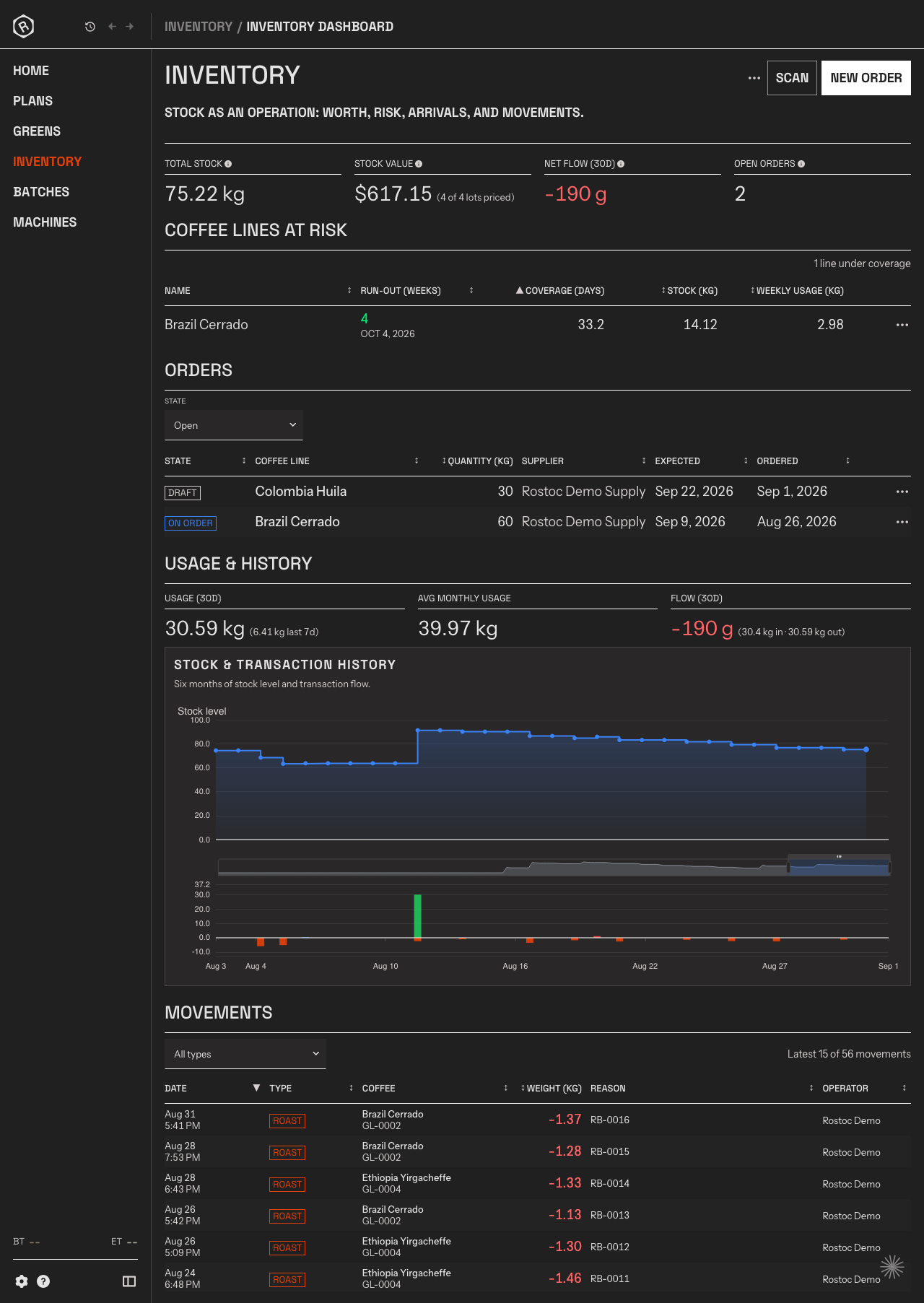
The Inventory dashboard shows stock and usage alongside the movements behind them. In the ledger at the bottom, roast rows carry a coffee, lot, weight, and batch reference. Documentation screenshot with demonstration records.
To see how that fits your workflow, explore Rostoc's green coffee inventory, or follow the green inventory setup guide. If you are sorting out the physical storage first, our green coffee storage guide is a useful companion.