Coffee roaster inventory software for green lots, stock, and batch usage.
Coffee roaster inventory software should do more than list bags in storage. Rostoc connects green coffee lots, warehouse locations, stock movements, planned usage, sample roasting, and roast batch consumption so inventory and production stay aligned.
Updated September 24, 2026 | Rostoc
Direct Answer
Coffee roaster inventory software helps a roastery track green coffee lots, stock levels, storage locations, usage, and roast-batch consumption.
For teams searching for coffee roaster inventory software, the key distinction is whether the inventory record stays connected to roast planning and completed batches. A static stock list can show what is on hand, but it cannot explain which lot was roasted, why a lot changed, or how stock moved through production.
The important part is the connection to production. Inventory is most useful when each lot can be traced into the roast plans and batches that used it, rather than living in a separate spreadsheet that has to be reconciled later.
- Track coffee lines and lots separately.
- Record receipts, adjustments, splits, transfers, and roast consumption.
- Connect active lots to roast plans and completed batches.
- Review stock levels before production is blocked by missing coffee.
Why Spreadsheets Break Down
Spreadsheets are a reasonable first inventory system. They become risky when roast production depends on several people trusting the same numbers.
The common failure mode is not that the spreadsheet disappears. It is that stock counts, active lots, roast plans, and completed batch records drift away from each other. Someone updates one place, forgets another, or records a roast without connecting it back to the lot that was consumed.
- The team has stock on paper but cannot tell which lot should be roasted next.
- A roast batch used a different lot than the one recorded in inventory.
- Green coffee deductions are applied days after production.
- Physical counts require detective work because adjustments do not have reasons.
- Lot transitions are hard to review after a coffee changes crop, supplier, or warehouse.
How Rostoc Structures Green Inventory
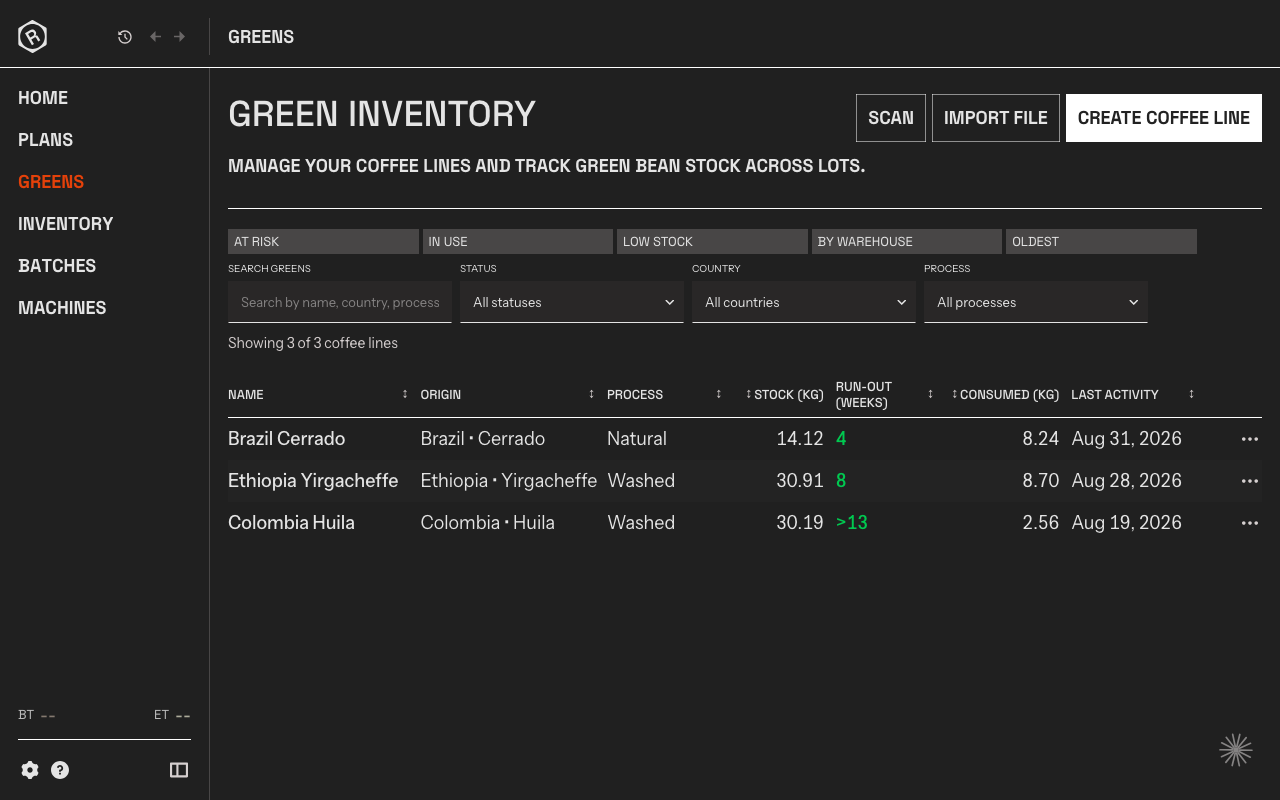
Rostoc organizes green coffee inventory around the same structure described in the green inventory docs: Coffee Lines, Lots, and Warehouses.
A Coffee Line represents an ongoing coffee category such as a production blend component or single-origin product. A Lot represents a specific delivery or purchase under that line. A Warehouse represents where the coffee is stored.
That structure lets a roastery keep a stable production identity while still tracking specific deliveries, crop years, suppliers, quality measurements, storage locations, and stock movements.
| Inventory Object | What It Tracks | Why It Matters |
|---|---|---|
| Coffee Line | The ongoing coffee identity or production use | Keeps batches comparable across deliveries and lot transitions |
| Lot | A specific purchase or delivery | Preserves traceability for crop year, supplier, quality, cost, and remaining stock |
| Warehouse | A physical or logical storage location | Shows where green coffee is held before production |
| Transaction | Receipt, roast, adjustment, split, or transfer | Creates an audit trail instead of silently changing inventory numbers |
From Green Lot To Roast Batch
Inventory software becomes more useful when it follows the coffee into roasting. In Rostoc, a roast plan can be linked to a green coffee, and each completed roast batch keeps the inventory context attached to the production record.
That includes sample roasting. When a small Nucleus Link sample roast is connected to the lot it used, the sample is no longer just a curve or cupping note. It becomes part of the same inventory and decision record as the production roast that may follow.
That means a production review can answer practical questions: which lot did this batch consume, how much green coffee was charged, what remained afterward, and whether the plan or lot changed between successful and unsuccessful batches.
- Receive a lot and record its initial green weight.
- Mark the active lot for a Coffee Line when it should be used for new plans.
- Connect the coffee to a roast plan before production.
- Save the roast batch with its coffee, machine, charge weight, and outcome.
- Review lot usage and stock history when planning the next production day.
Coffee Roaster Inventory Software Checklist
Use this checklist when comparing inventory tools for a small or growing roastery.
| Capability | Why It Matters | What To Check |
|---|---|---|
| Lot-level stock | Prevents different deliveries from being blended together in the records | Can each delivery have its own crop, supplier, quality, and remaining weight? |
| Stock movements | Explains why inventory changed | Are receipts, roasts, adjustments, splits, and transfers visible? |
| Roast-batch connection | Makes production traceable | Can a completed batch show which lot it consumed? |
| Planning context | Helps production choose the right coffee before roasting | Can active lots and planned usage guide the roast day? |
| Spreadsheet import | Reduces the cost of switching | Can existing CSV/XLS/XLSX inventory be mapped and reviewed before import? |
| Warehouse tracking | Keeps physical storage aligned with records | Can locations be managed without creating a separate system? |
Where Rostoc Fits
Rostoc is not trying to replace every accounting, purchasing, ecommerce, or finished-goods inventory system.
It focuses on the part of inventory that matters most to roasting: which green coffee is available, which lot should be used, how that coffee connects to roast plans, and what each completed batch consumed.
For teams moving beyond spreadsheets, that gives inventory a direct relationship to roast history instead of turning it into another database to maintain.
- Tracked: coffee lines, lots, and warehouses, with receipts, manual adjustments, transfers, roast consumption, and reversals - each carrying a reason and a correction trail.
- Tracked: stock levels, inventory value, usage trends, and how many days of coverage a lot has left before it runs out.
- Not tracked: roasted and packaged stock, bag or SKU counts, purchase orders, wholesale orders, and accounting.
- If finished-goods inventory or order management is the reason you are looking, Rostoc will not cover it on its own, and the comparison tool will point you elsewhere.
What The Inventory Dashboard Shows
Knowing what is in the warehouse is the easy half. The harder question a roastery asks on a Monday is how long the coffee lasts at the rate it is actually being roasted, and that is what the inventory dashboard answers.
Stock value is shown alongside the number of lots it was calculated from -- "14 of 21 lots priced" -- because a valuation drawn from partial cost data is worth having only when you can see how partial it is. Cost is recorded per lot as a cost per kilogram, which is a green coffee figure, not a landed or fully costed one.
- Stock value, stated with how many lots carry a purchase price.
- Usage over 7, 30 and 90 days, plus an average monthly rate.
- Coverage in days, from current stock against the rate you are consuming it.
- Active lot count, and the oldest active lots for aging review.
| Question | What the dashboard shows |
|---|---|
| How much coffee do we hold? | Stock level, by lot and by coffee line |
| What is it worth? | Stock value, qualified by how many lots are priced |
| How fast are we using it? | Usage at 7, 30 and 90 days, and average monthly |
| How long will it last? | Coverage in days at the current rate |
| What is sitting too long? | Oldest active lots, by age in days |
Every Movement Leaves A Row
Stock counts drift when changes are made without a reason attached. Rostoc records green coffee movement as transactions rather than as edits to a number, so a physical count that disagrees with the system can be traced instead of investigated.
Five movement types are recorded: receipts when coffee arrives, roast consumption when a batch is saved against a lot, manual adjustments, transfers between warehouses, and reversals when a roast is undone. Six months of stock level and transaction flow are kept on the history chart.
- Receipt, roast consumption, manual adjustment, transfer, and reversal.
- Roast consumption is written by the batch, not typed in afterwards.
- Six months of stock level and flow history.
- Adjustments carry a reason, so a count difference has somewhere to start.
Where This Sits, And Where It Stops
Green coffee inventory, lot tracking, and the inventory dashboard are Growth plan capabilities. Roast logging, roast plans, profiles, and batch records are not -- those work on every plan, including the free one.
The boundary is worth stating plainly. Rostoc records green coffee cost per kilogram and values stock from it. It is not a cost accounting system: there is no landed cost, no overhead allocation, and no cost of goods sold. It also does not watch stock on your behalf -- coverage and run-out are shown when you look, and nothing is sent to you when a number crosses a line.
- Green coffee inventory and lot tracking are on the Growth plan.
- Cost is recorded as green cost per kilogram, per lot.
- Not a cost accounting system: no landed cost, overhead, or COGS.
- Coverage is shown on the dashboard; no alerts are sent.
- See what Growth includes.
FAQ
What is coffee roaster inventory software?
Coffee roaster inventory software helps roasteries track green coffee lots, stock levels, storage locations, movements, and roast-batch consumption.
What should I look for in coffee roaster inventory software?
Lot-level records rather than one stock number per coffee, warehouse locations, a ledger that records every stock movement, and a link from each roast batch to the lot it consumed, so stock falls when you roast rather than when someone updates a sheet. Spreadsheet import with a mapping preview matters in the first week. In Rostoc, green coffee inventory and lot tracking are part of the Growth plan.
Can Rostoc replace my green coffee spreadsheet?
Rostoc can replace the parts of a spreadsheet used for green coffee lots, stock levels, usage history, and links to roast batches. Some businesses may still use separate accounting, purchasing, or finished-goods systems.
Can Rostoc import green inventory from a spreadsheet?
Yes. Rostoc supports green inventory import from CSV, XLS, or XLSX files with a mapping and preview step before records are saved.
Does Rostoc track warehouses?
Yes. Rostoc can track Warehouses as physical or logical storage locations for green coffee lots.
Does inventory connect to roast batches?
Yes. Rostoc is designed so green coffee inventory can stay connected to roast plans and completed roast batches, preserving traceability from lot to production record.
Does Rostoc track roasted coffee, packaging, or wholesale orders?
No. Rostoc tracks green coffee - lines, lots, warehouses, and every stock movement including what each roast consumed. Roasted and packaged stock, SKU counts, purchase orders, and wholesale orders are outside what it does today. If those are the reason you are looking, a production or ERP system will serve you better.