Aillio Bullet roasting software and USB setup with Rostoc.
Rostoc supports experimental read-only roast logging for selected Aillio Bullet R1, R1 IBTS, and R2 workflows over USB. Use this page to decide where Rostoc fits beside RoasTime and Artisan, then validate your exact Bullet model before production use.
Updated August 9, 2026 | Rostoc
Direct Answer
Rostoc is not the native Aillio Bullet control app. Use RoasTime for Bullet-specific operation, recipes, automation, and Roast.World workflows. Use Artisan when you want a highly configurable technical roast logger. Use Rostoc when Bullet roast data should become part of inventory, plans, batches, notes, and production records.
Rostoc Aillio support should be treated as experimental until you confirm live readings, stream labels, and saved batch records on the exact Bullet generation in front of you.
- Supported Rostoc path: experimental read-only USB roast logging.
- Expected models: Bullet R1, Bullet R1 IBTS, and Bullet R2 catalog entries.
- No COM port to pick in Rostoc: the Bullet is found automatically, whether its firmware presents a direct USB device or a serial port.
- First workflow: validate a short roast, save it, and reopen the batch before daily use.
Supported Bullet models in Rostoc
Choose the catalog entry that matches the hardware generation. The Bullet speaks Aillio's own protocol, even on newer R1 firmware that presents a serial COM port, so selecting a generic serial device or thermocouple fallback is the wrong troubleshooting branch.
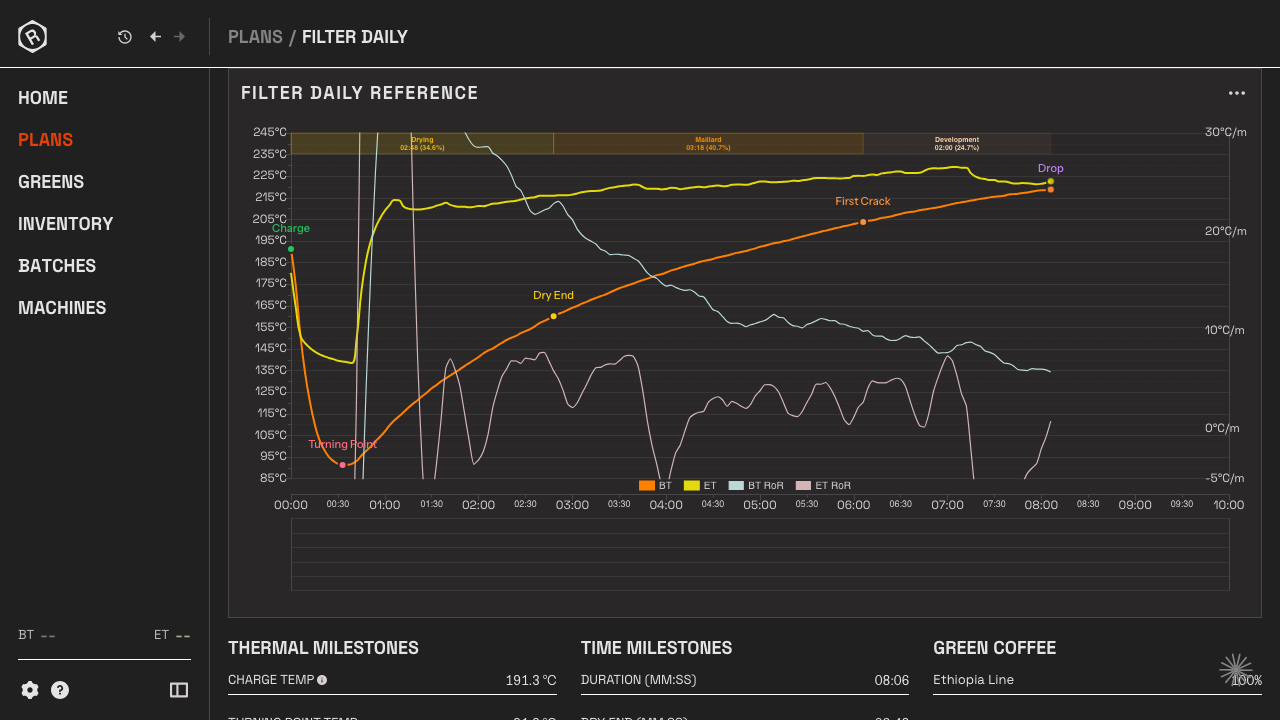
The exact fields vary by model generation. Rostoc normalizes the useful roast streams into chart and record data so the roast can sit beside green lots, plans, and batches.
| Model entry | Rostoc support status | Primary setup note |
|---|---|---|
| Aillio Bullet R1 | Experimental | Read-only USB telemetry; validate BT, environmental or drum temperature, heater, fan, drum, and rate-of-rise streams. |
| Aillio Bullet R1 IBTS | Experimental | Read-only USB telemetry; validate IBTS and probe mapping against the Bullet display or trusted software. |
| Aillio Bullet R2 | Experimental | Read-only USB telemetry; validate temperature, fan, pressure, energy, and power-related feedback streams on the exact machine. |
RoasTime, Artisan, and Rostoc are different tools
Aillio positions RoasTime as the native Bullet software for logging, analysis, automation, and Roast.World access. Artisan documents Aillio Bullet R1/R2 support through a vendor-specific USB protocol. Rostoc is a roastery operations layer: it is useful when the roast record needs to stay connected to inventory and production context.
For many teams, the practical answer is not replacing every tool. It is deciding which system owns which job during roasting, review, inventory, and production planning.
| Need | Best starting point | Why |
|---|---|---|
| Native Bullet operation | RoasTime | It is the Aillio-native software path for Bullet-specific workflows. |
| Configurable technical logging | Artisan | It exposes detailed machine setup and logging controls for experienced users. |
| Inventory-connected production records | Rostoc | It links roast data to green lots, plans, batches, notes, and later decisions. |
| First Rostoc test | Rostoc plus your trusted reference | Compare readings before depending on experimental support. |
USB setup checklist
There is no COM port to choose in Rostoc. Older Bullet R1 firmware appears as a direct USB device, firmware 626 and later as a serial COM port, and Rostoc falls back between them automatically. Start from the Bullet catalog entry, connect the roaster with a data-capable USB cable, and close software that may already be holding the device.
If another app can see the Bullet and Rostoc cannot, treat that as a connection-ownership or driver investigation, not a reason to switch the machine to a generic serial entry. On Bullet R1 firmware 626 or later, update Rostoc first: versions before 0.3.70 cannot connect that firmware, and the serial path that replaced it is new and still being validated.
- Add the exact Aillio Bullet model from the Rostoc catalog.
- Connect the Bullet directly over USB with a data-capable cable.
- Update Rostoc to 0.3.70 or later before connecting a Bullet R1 on firmware 626 or later.
- Close RoasTime, Artisan, or any other app that may already be connected during validation.
- Start read-only logging and compare live values with the Bullet display or a trusted reference.
- Save a validation batch and reopen it to confirm labels, values, and chart routing.
Why Rostoc may still matter if RoasTime already works
If RoasTime already works well for your Bullet, keep using it for the jobs it does best. Rostoc matters when the roast becomes part of a larger roastery record: which green lot was used, which plan was active, what batch was produced, which notes were captured, and how the result compares with future production.
That makes Rostoc most valuable for teams that want Bullet logging to feed inventory, planning, production history, and repeatability decisions instead of living only as a curve file.
Next reading
For software selection, read Aillio Bullet software: RoasTime, Artisan, and Rostoc. For the USB and telemetry details, read How Aillio Bullet telemetry works in Rostoc.
For setup help inside the product docs, use the Aillio Bullet USB docs and the machine compatibility guide.
Source Notes
Aillio describes RoasTime 4 as the Bullet software path for logging, analysis, automation, Roast.World access, and Mac, Windows, and Linux downloads: Aillio RoasTime 4.
Artisan documents Aillio Bullet R1/R2 support as a vendor-specific USB protocol and includes setup notes for Bullet models: Artisan Aillio machine page.
For current Rostoc status, use this page together with the Rostoc machine compatibility guide and the matching catalog entry.
FAQ
Does Rostoc support Aillio Bullet roasters?
Rostoc has experimental read-only roast logging support for selected Aillio Bullet R1, R1 IBTS, and R2 catalog entries. Validate the exact machine before production use, and on Bullet R1 firmware 626 or later update to Rostoc 0.3.70 or newer first.
Does Aillio Bullet use a COM port in Rostoc?
You never choose a COM port in Rostoc, but newer Bullet R1 firmware (626 and later) does present one to the operating system. Rostoc tries the direct USB connection first and falls back to the serial port automatically. If a COM port appears, leave the driver alone; that is normal on new firmware.
Should I use RoasTime, Artisan, or Rostoc with an Aillio Bullet?
Use RoasTime for native Bullet operation, Artisan for configurable technical logging, and Rostoc when the roast record should connect to green inventory, roast plans, batches, notes, and production history.
Can Rostoc control my Aillio Bullet?
Do not assume control support from this page. The public Rostoc Aillio path is experimental read-only roast logging and saved records.
What should I validate first?
Validate the exact catalog entry, USB detection, live temperatures, feedback streams, rate-of-rise behavior, saved batch records, and chart labels before daily use.